

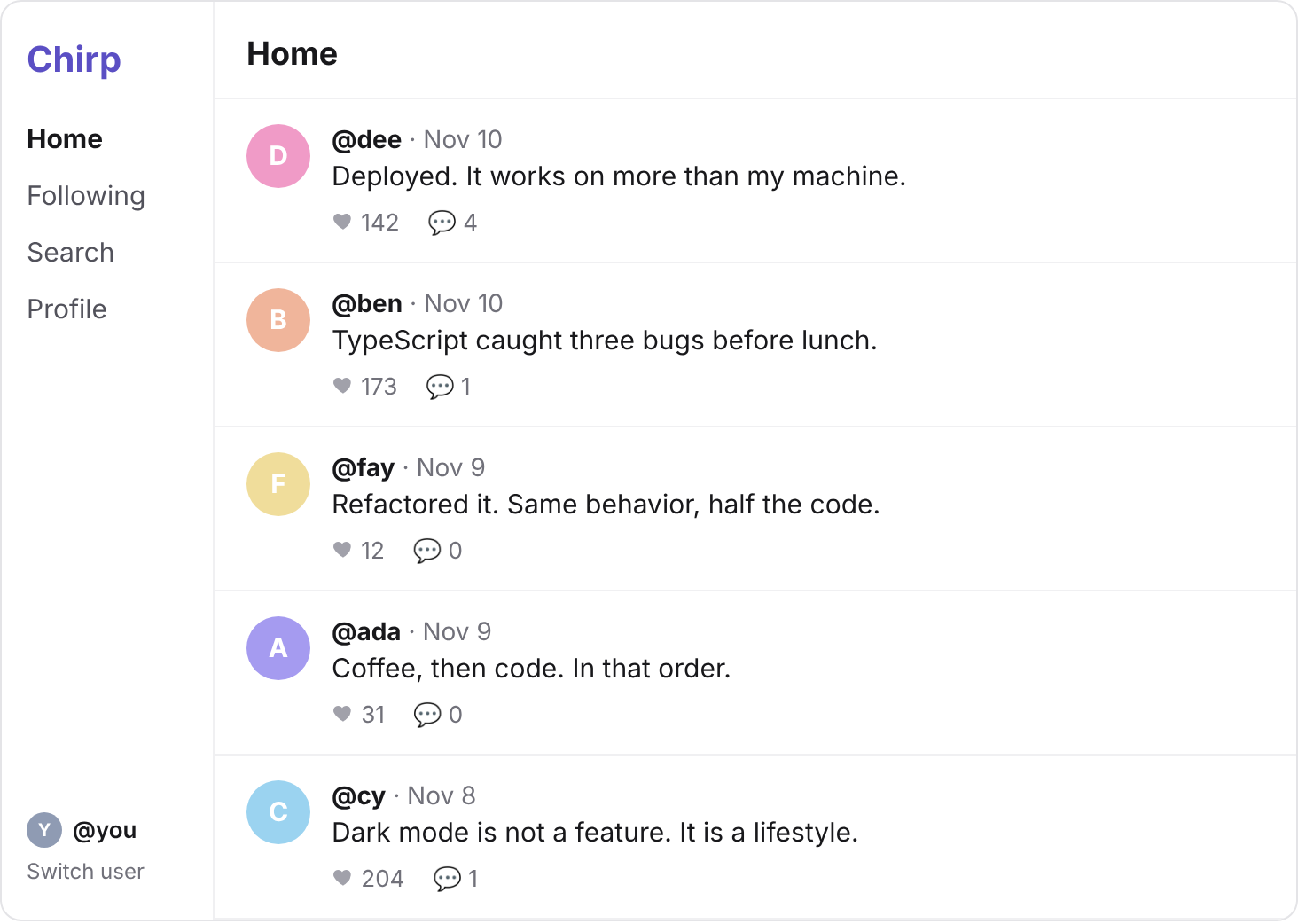
Every post card on Chirp's feed shows how many comments it has, like 💬 2.
You wrote that: countComments(postId) counts one post's comments.
And the feed calls it once for each of its 10 posts.
So how many queries does one visit to Chirp's feed send?
You can't see them yet: the library sends them quietly.
In this project you make every query show up in your terminal, and count them.
Then you cut them down, the way you'd fix Ada's dashboard on Simplified.
Chirp's feed, getting every comment count in one query instead of one per post.
Each query the library sends is one request, from your server to Supabase, like a fetch() you'd write.
Supabase's server keeps a connection pool to your Postgres.
It borrows a connection, runs your query, and returns it.
The library lets you hand it your own fetch, to send those requests with.
So you can give it one that prints each request first.
Open lib/supabase.ts, and change it to this.
import "server-only";
import { createClient } from "@supabase/supabase-js";

function logQuery(input: RequestInfo | URL, init?: RequestInit) {
  const url = new URL(String(input));
  console.log("query:", init?.method ?? "GET", decodeURIComponent(url.pathname + url.search));
  return fetch(input, init);
}

export const supabase = createClient(
  process.env.SUPABASE_URL!,
  process.env.SUPABASE_SECRET_KEY!,
  { global: { fetch: logQuery } },
);
logQuery prints the request's table and what it asks for, then sends it with the usual fetch.
Save, and reload localhost:3000.
You should see
Lines that start with query: in the terminal running npm run dev, and the feed as before.
Clear your terminal, then reload localhost:3000 once.
Each line names its table after /rest/v1/.
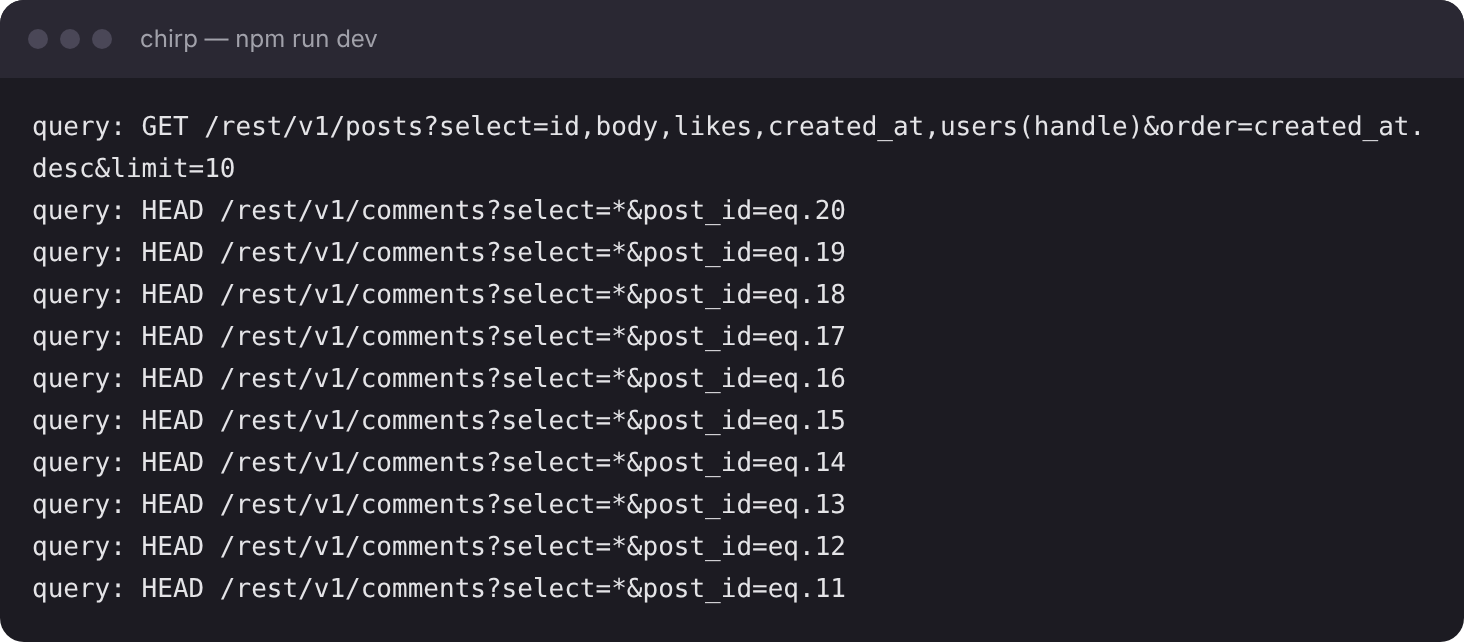
Find the feed's own query: it reads posts, and ends in limit=10.
query: GET /rest/v1/posts?select=…&order=created_at.desc&limit=10
Then find the lines that read comments, one for each post, like this.
query: HEAD /rest/v1/comments?select=*&post_id=eq.20
query: HEAD /rest/v1/comments?select=*&post_id=eq.19
Leave the other lines: they're Trending, Most active and the Switch user menu.
So the feed takes one query for its list of posts, then one more for each post.
That's an N+1 query, with N of 10.
And the feed's loop waits for each count before it asks for the next.
So each query is one more round trip, there to Supabase and back, one after another.
Next.js prints a line for the page too, GET / 200 in …. Note its time.
You should see
One query for posts with limit=10, and ten for comments, from post_id=eq.20 down to post_id=eq.11: 11 queries for the feed.
The feed shows posts 11 to 20.
Postgres can count the comments on all ten in one query, grouping them by post.
Write that query first, in Supabase's SQL Editor, so you can see its rows.
Your turn 1
Write one query that counts the comments on posts 11 to 20, with one row for each post and its count.
Four rows, in any order, if you've done checkpoints 5 and 6 as written:
| post_id | count |
|---|---|
| 11 | 1 |
| 16 | 1 |
| 19 | 1 |
| 20 | 4 |
SELECT post_id, COUNT(*)
FROM comments
WHERE post_id IN (11, 12, 13, 14, 15, 16, 17, 18, 19, 20)
GROUP BY post_id;
You should see
Rows of post_id and count under the editor, one row for each post that has comments.
Your query asked about ten posts, but sent back four rows.
Why not ten?
Because GROUP BY makes a group only from rows that are there.
Posts 12, 13, 14, 15, 17 and 18 have no comments, so they make no group, and get no row.
So the feed must show 0 for every post the result leaves out.
You turned on the library's grouping in "Sort, search and count":
| SQL you know | Supabase's library |
|---|---|
SELECT post_id, COUNT(*) … GROUP BY post_id | .select("post_id, count()") |
WHERE post_id IN (11, 12, 13) | .in("post_id", [11, 12, 13]) |
Your turn 1
In lib/data.ts, write countCommentsOn(postIds): it takes a list of post IDs, and returns each one's comment count, from one query.
It sends one query, and returns a count for each post that has comments.
// SELECT post_id, COUNT(*) FROM comments WHERE post_id IN (11, 12, …, 20) GROUP BY post_id;
export async function countCommentsOn(postIds: number[]) {
  const { data, error } = await supabase
    .from("comments")
    .select("post_id, count()")
    .in("post_id", postIds);
  if (error) throw new Error(error.message);
  return new Map(data.map((row) => [row.post_id, row.count]));
}
Your turn 2
In app/page.tsx, replace the loop that calls countComments(post.id) with one call to countCommentsOn. Give each post 0 when it has no row.
Every card shows the same count as before: 💬 4 on Dee's "Deployed. It works on more than my machine.", and 💬 0 on Fay's "Refactored it."
const posts = await getPosts();
const counts = await countCommentsOn(posts.map((post) => post.id));
const feed = posts.map((post) => ({ ...post, comments: counts.get(post.id) ?? 0 }));
You should see
The feed with the same comment counts as before, and no card left blank.
Clear your terminal, and reload localhost:3000 once.
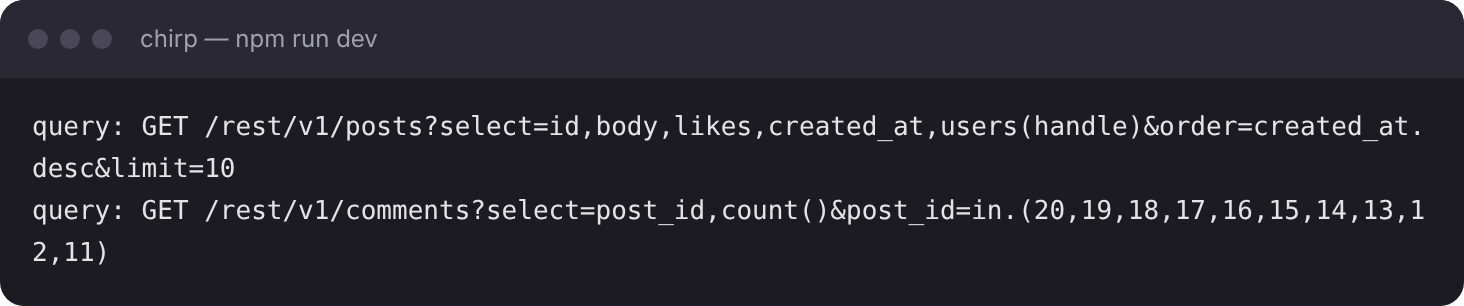
query: GET /rest/v1/posts?select=…&order=created_at.desc&limit=10
query: GET /rest/v1/comments?select=post_id,count()&post_id=in.(20,19,18,17,16,15,14,13,12,11)
Postgres still goes through the comments, one at a time, putting each in its post's group.
But it does that on the database server, right next to the rows.
Compare the page's time, on its GET / 200 in … line, with step 2's.
Now, in getPosts(), change .limit(10) to .limit(50), and reload once more.
The old loop would have sent 51 queries for 50 posts.
Then change it back to .limit(10).
You should see
2 queries for the feed, not 11: one for posts and one for comments. With .limit(50), still 2.
countComments(postId) is no longer called by the feed. Delete it if nothing else uses it.
Then commit your changes, and push them to GitHub.
git add -A
git commit -m "Count every post's comments in one query"
git push
You should see
Your commit on GitHub, with the new lib/supabase.ts and countCommentsOn in it.
No lines start with query: in my terminal
Look in the terminal running npm run dev, not the browser's console. Your queries run on the server, so they print there.
Posts with no comments show nothing, or NaN
Those posts have no row in the result. Use counts.get(post.id) ?? 0, so a missing row reads as 0.
Every post shows 💬 0
Without post_id in .select(…), Postgres counts all the comments as one group. Name post_id beside count().
An error that says Use of aggregate functions is not allowed
Aggregates are off in this project. Run the two lines from step 5 of "Sort, search and count" in the SQL Editor.
A count looks wrong
Run your step 3 query in the SQL Editor. If its rows are right there, the bug is in your code.
Supabase says your project is paused
Free projects pause after a week with no activity. Press Restore project on its page, and wait a few minutes.
Tick every step once you've seen what it says you should see. Then mark the project complete to unlock the next lesson.