

Chirp has three tables now: users, posts, and follows, which links people to the people they follow.
Each post holds its author's id, and the feed joins it to users for the handle.
But the post page, at localhost:3000/post/4, has an empty space under the post.
That's where its comments go, and Chirp has nowhere to keep them yet.
So what table do comments need, and how does each one point at its post and its author?
This time nobody hands you the columns: you design the table from the screen.
Then you show comments under each post, let people add one, and count them on every post card.
Comments under every post on Chirp, from a table you designed, with a count on each post card.
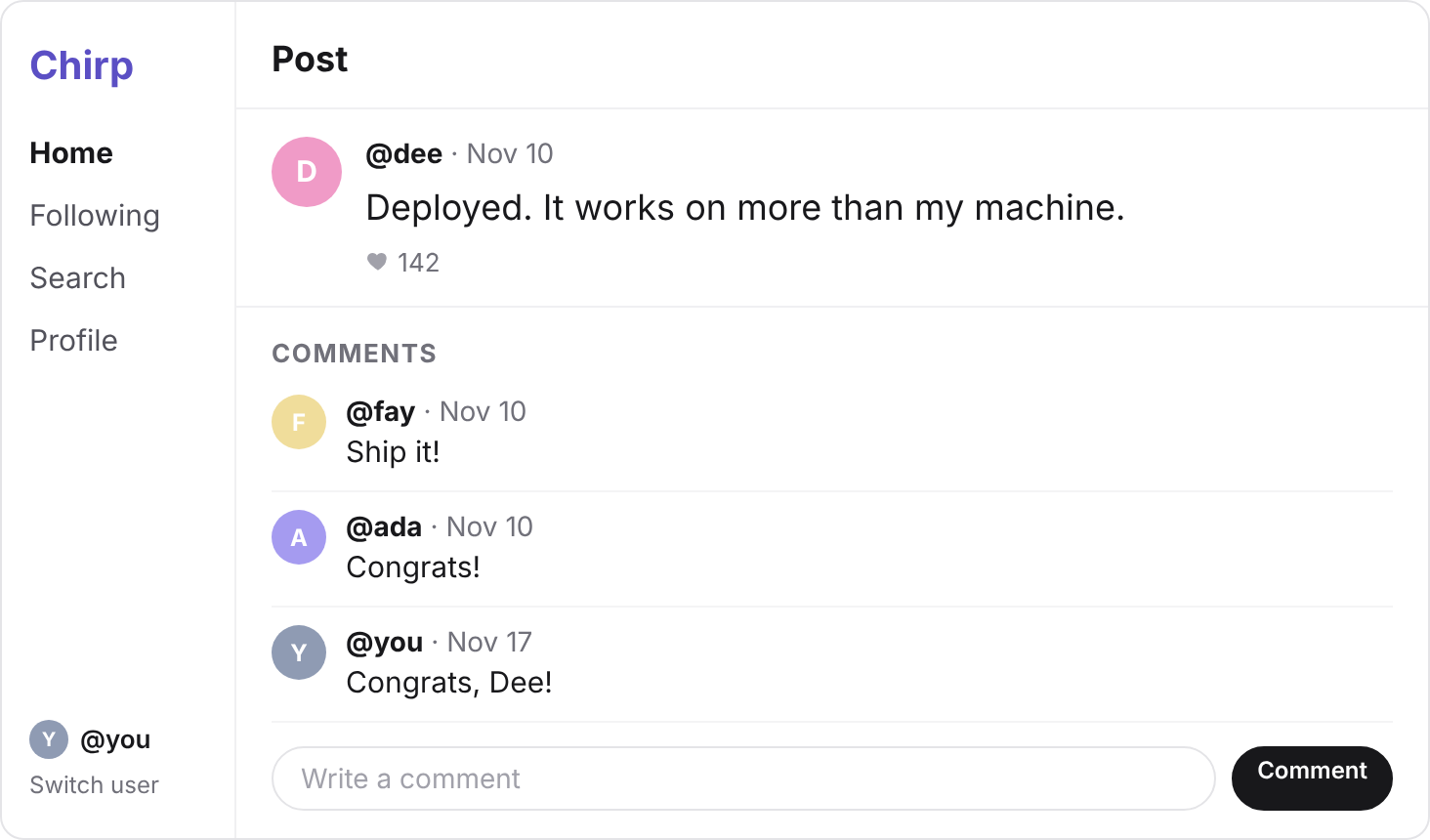
Under each post, Chirp shows its comments.
Each comment shows who wrote it, what they wrote, and when.
Before you write any SQL, answer these four questions:
Name each column the way Chirp's other tables do, so the comments in the next step fit.
Then open the SQL Editor in your Supabase project, simplified-practice.
If Supabase asks about RLS when you run your query, pick Run and enable RLS, as you did for posts.
Your turn 1
Write the CREATE TABLE query for comments, from your answers, and run it. A comment's text is at most 280 characters, like a post's.
Success. No rows returned under the editor, and column names that match the solution's.
CREATE TABLE comments (
  id         integer PRIMARY KEY GENERATED ALWAYS AS IDENTITY,
  post_id    integer NOT NULL REFERENCES posts (id),
  user_id    integer NOT NULL REFERENCES users (id),
  body       varchar(280) NOT NULL,
  created_at timestamp NOT NULL DEFAULT now()
);
You should see
In the Table Editor, a comments table with no rows, and the same five column names as the solution.
Your table is empty, so every post page would show no comments.
Paste this query into the SQL Editor, and press Run once.
INSERT INTO comments (post_id, user_id, body, created_at)
VALUES
  (1, 2, 'Wait until you meet JOIN.', '2026-11-01 10:02'),
  (1, 3, 'SELECT star is the gateway.', '2026-11-01 11:30'),
  (4, 2, 'Screenshot or it did not happen.', '2026-11-02 19:40'),
  (4, 1, 'Teach me your ways.', '2026-11-02 20:15'),
  (4, 7, 'Saving this for later.', '2026-11-03 08:00'),
  (11, 4, 'Same here.', '2026-11-06 13:00'),
  (16, 6, 'Lifestyle confirmed.', '2026-11-09 07:45'),
  (19, 5, 'Only three?', '2026-11-10 14:10'),
  (20, 6, 'Ship it!', '2026-11-10 17:45'),
  (20, 1, 'Congrats!', '2026-11-10 18:05');
Each row holds the id of the post it's on, then the id of its author.
Both are foreign keys, so Postgres checks that each post and each author exists.
You should see
In the Table Editor, comments with 10 rows. Row 5 holds post_id 4 and user_id 7: that's you.
Open Dee's post, "Centering a div on the first try.", at localhost:3000/post/4.
Its comments come from getComments(postId) in lib/data.ts, which still returns sample data.
Each comment needs its text, its time, and its author's handle, which lives in users.
In SQL, that is a JOIN, with the oldest comment first.
SELECT comments.id, comments.body, comments.created_at, users.handle
FROM comments
JOIN users ON comments.user_id = users.id
WHERE comments.post_id = 4
ORDER BY comments.created_at;
With Supabase's library, the JOIN goes inside .select(…), as users(handle).
export async function getComments(postId: number) {
  // SELECT comments.id, comments.body, comments.created_at, users.handle
  // FROM comments JOIN users ON comments.user_id = users.id
  // WHERE comments.post_id = 4 ORDER BY comments.created_at;
  const { data, error } = await supabase
    .from("comments")
    .select("id, body, created_at, users(handle)")
    .eq("post_id", postId)
    .order("created_at", { ascending: true });
  if (error) throw new Error(error.message);
  return data;
}
The library finds the foreign key from comments to users, so it writes the ON for you.
Each comment comes back with its author inside it, like users: { handle: "ben" }.
Replace getComments(postId) with this one, save, and reload the page.
You should see
Three comments under Dee's post, oldest first: ben's "Screenshot or it did not happen.", ada's "Teach me your ways.", then yours.
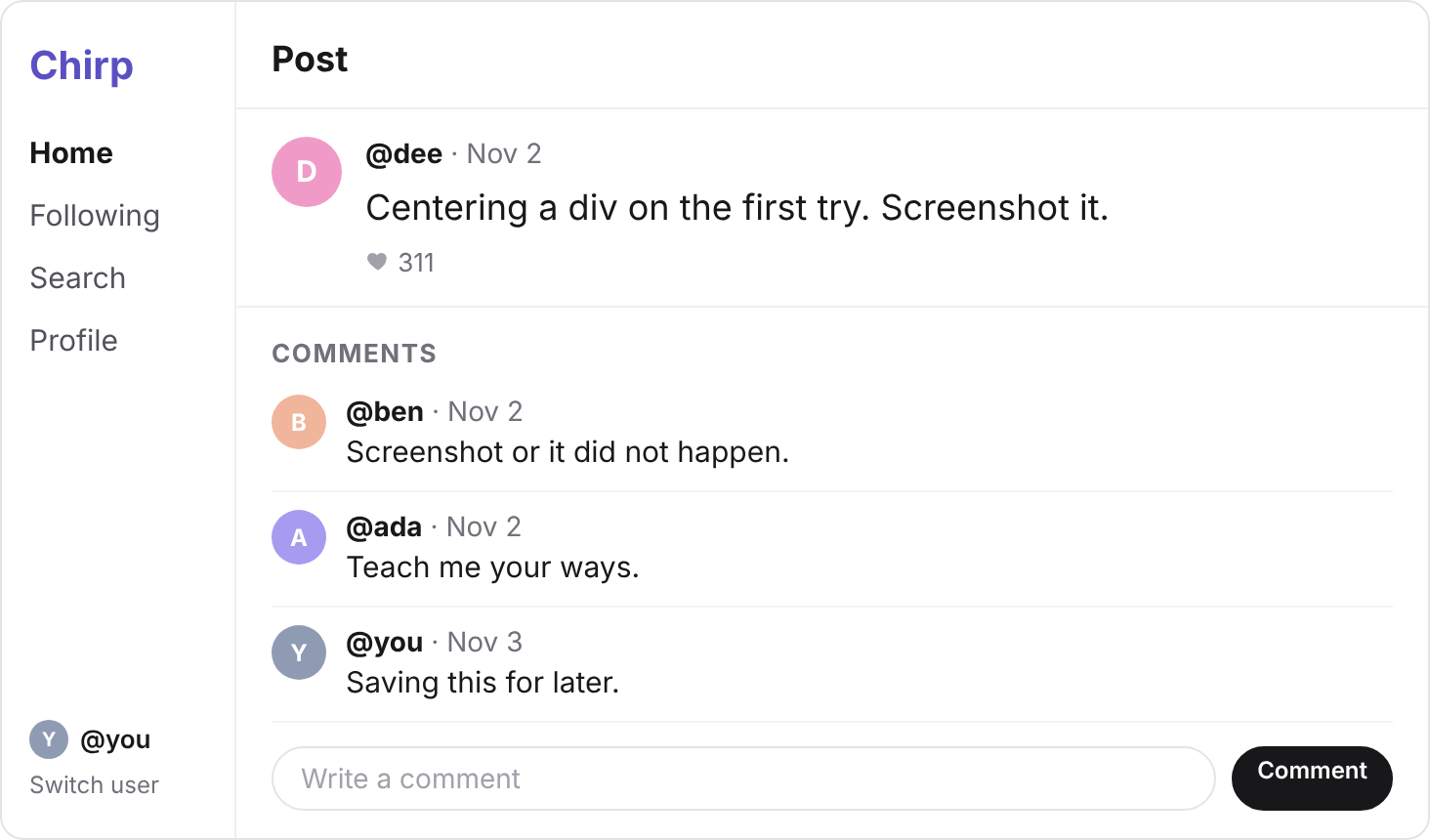
Under the comments is a box to write one, with a Comment button.
Its form calls addComment(postId, userId, body), with your id from getMe().
addComment still does nothing, so your comment goes nowhere.
Your turn 1
Make addComment(postId, userId, body) add a row to comments, on that post, by that author.
On Dee's post "Deployed. It works on more than my machine.", at localhost:3000/post/20, comment Congrats, Dee! It shows last, under the handle you.
export async function addComment(postId: number, userId: number, body: string) {
  // INSERT INTO comments (post_id, user_id, body) VALUES (20, 7, 'Congrats, Dee!');
  const { error } = await supabase
    .from("comments")
    .insert({ post_id: postId, user_id: userId, body });
  if (error) throw new Error(error.message);
}
You should see
Three comments under Dee's "Deployed" post: fay's "Ship it!", ada's "Congrats!", then your "Congrats, Dee!"
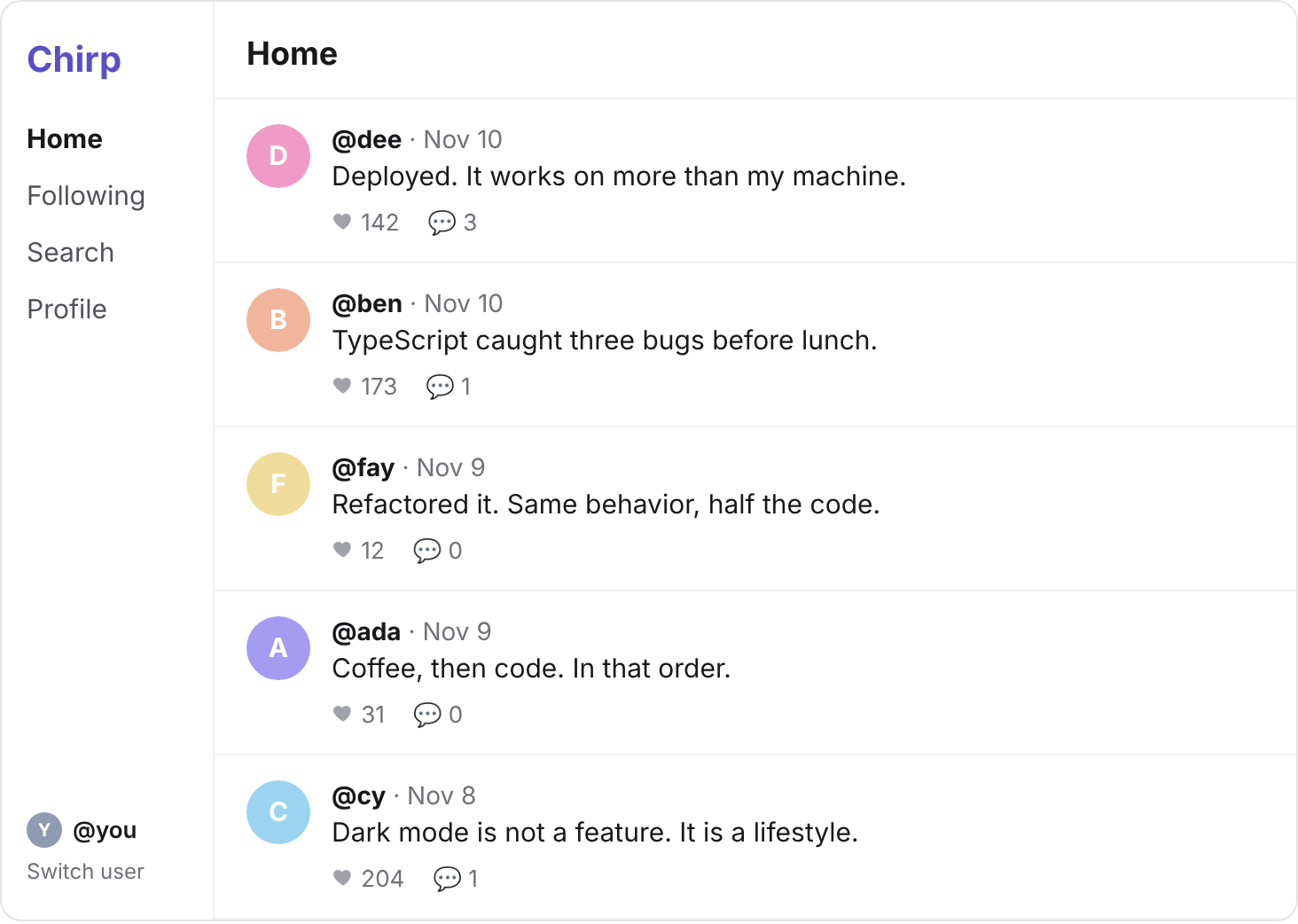
Each post card in the feed has room for how many comments it has, like 💬 3.
The feed page calls countComments(postId) for each post, which still returns sample data.
Your turn 1
Make countComments(postId) return how many comments that post has, counted by Postgres.
On localhost:3000, these four cards have comments, and every other card shows 💬 0:
| Post | Comments |
|---|---|
| Dee: "Deployed. It works on more than my machine." | 💬 3 |
| Ben: "TypeScript caught three bugs before lunch." | 💬 1 |
| Cy: "Dark mode is not a feature. It is a lifestyle." | 💬 1 |
| Ada: "Tailwind makes me feel like a designer." | 💬 1 |
export async function countComments(postId: number) {
  // SELECT COUNT(*) FROM comments WHERE post_id = 20;
  const { count, error } = await supabase
    .from("comments")
    .select("*", { count: "exact", head: true })
    .eq("post_id", postId);
  if (error) throw new Error(error.message);
  return count ?? 0;
}
You should see
💬 3 on Dee's "Deployed" card, counting your comment. If you added more than one, it shows more.
Say Ada wants a new handle: ada_codes.
She has comments on two of Dee's posts, and four posts of her own.
So how many rows must change, for all of them to show her new handle?
Find out in the SQL Editor.
Your turn 1
Change Ada's handle to ada_codes with one UPDATE in the SQL Editor. Her id is 1.
Reload localhost:3000/post/4: Ada's comment now says ada_codes.
UPDATE users SET handle = 'ada_codes' WHERE id = 1;
You should see
ada_codes beside Ada's comments on /post/4 and /post/20, and on her posts in the feed.
One row changed, because each comment holds her id, 1, and finds her handle through it.
Then run the same UPDATE with 'ada', so her handle is back.
Commit your changes, and push them to GitHub.
git add -A
git commit -m "Add comments"
git push
You should see
Your commit on GitHub, with the new lib/data.ts in it.
Step 2's query says a column of comments does not exist
Your columns have other names than the solution's. Run DROP TABLE comments;, then run the solution's CREATE TABLE, then step 2's query again.
An error like Could not find a relationship between 'comments' and 'users'
Your user_id has no REFERENCES, so there is no foreign key for the library to join on. Drop the table and make it again from the solution.
Every card shows 💬 0
Read count from what the query sends back, not data. With head: true, data is empty.
A post shows the wrong comments
Run step 3's SQL in the SQL Editor. If its rows are right there, the bug is in your code, often a missing .eq("post_id", postId).
Supabase says your project is paused
Free projects pause after a week with no activity. Press Restore project on its page, and wait a few minutes.
Tick every step once you've seen what it says you should see. Then mark the project complete to unlock the next lesson.