

Chirp has 500,020 posts, each with a likes column, filled in by its seed.
But nobody can like a post yet, so those numbers never change.
So what happens when 50 people press ♥ on the same post at once?
In this project you give Chirp a likes table and a ♥ button.
You'll write the button the simple way, then fire 50 likes at it at once.
Then you'll fix what goes wrong, inside the database.
A like button that adds the like and the count together, and loses none when 50 people press it at once.
Chirp needs to know who liked which post, with one row for each like.
| Column | Type | Rules |
|---|---|---|
| user_id | integer | Never NULL, points at users, and goes when its user is deleted |
| post_id | integer | Never NULL, points at posts, and goes when its post is deleted |
Why delete a like when its user is deleted?
Because without an ON DELETE rule, Delete account would be refused again, for anyone who liked a post.
And what stops someone liking the same post twice?
The primary key is user_id and post_id together, like completions' user ID and lesson ID.
So Postgres refuses a second row for the same person and post.
A primary key on two columns goes on its own line, after the columns: PRIMARY KEY (user_id, post_id).
In the SQL Editor, pick Run and enable RLS if Supabase asks.
Your turn 1
Write the CREATE TABLE query for likes, from the table above, and run it.
Success. No rows returned under the editor.
CREATE TABLE likes (
  user_id integer NOT NULL REFERENCES users (id) ON DELETE CASCADE,
  post_id integer NOT NULL REFERENCES posts (id) ON DELETE CASCADE,
  PRIMARY KEY (user_id, post_id)
);
You should see
In the Table Editor, a likes table with the columns user_id and post_id, and no rows.
Every post card has a ♥ button beside its likes.
It calls likePost(postId, userId) in lib/data.ts, with your id from getMe(). It does nothing yet.
Write it in three requests, one after the other:
Your turn 1
Make likePost(postId, userId) add the like, then read the post's likes, and write back one more.
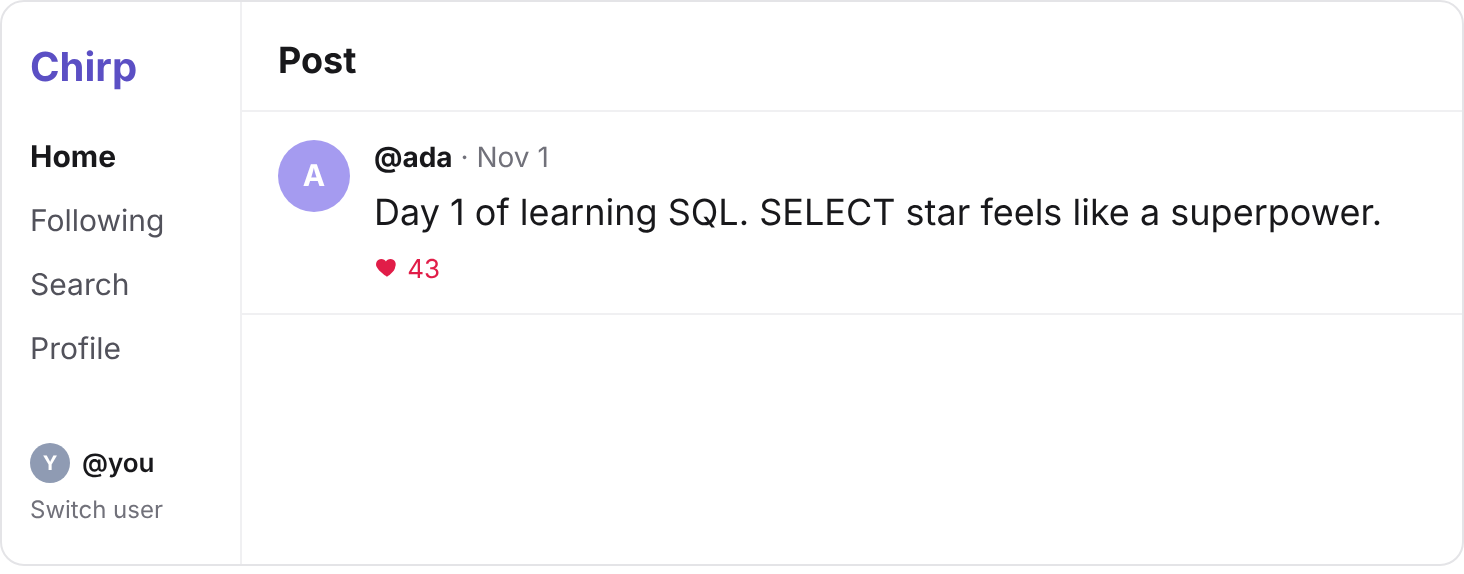
Press ♥ on Ada's "Day 1 of learning SQL": its 42 likes become 43.
// INSERT INTO likes (user_id, post_id) VALUES (7, 1);
// SELECT likes FROM posts WHERE id = 1;
// UPDATE posts SET likes = 43 WHERE id = 1;
export async function likePost(postId: number, userId: number) {
  const { error: likeError } = await supabase
    .from("likes")
    .insert({ user_id: userId, post_id: postId });
  if (likeError) throw new Error(likeError.message);

  const { data, error } = await supabase
    .from("posts")
    .select("likes")
    .eq("id", postId)
    .single();
  if (error) throw new Error(error.message);

  const { error: updateError } = await supabase
    .from("posts")
    .update({ likes: data.likes + 1 })
    .eq("id", postId);
  if (updateError) throw new Error(updateError.message);
}
You should see
43 likes on Ada's post, and in the Table Editor, one row in likes: user_id 7, post_id 1.
Press ♥ on it again: an error that names likes_pkey, and the post still has 43.
The primary key refused your second like, so your code stopped before the count.
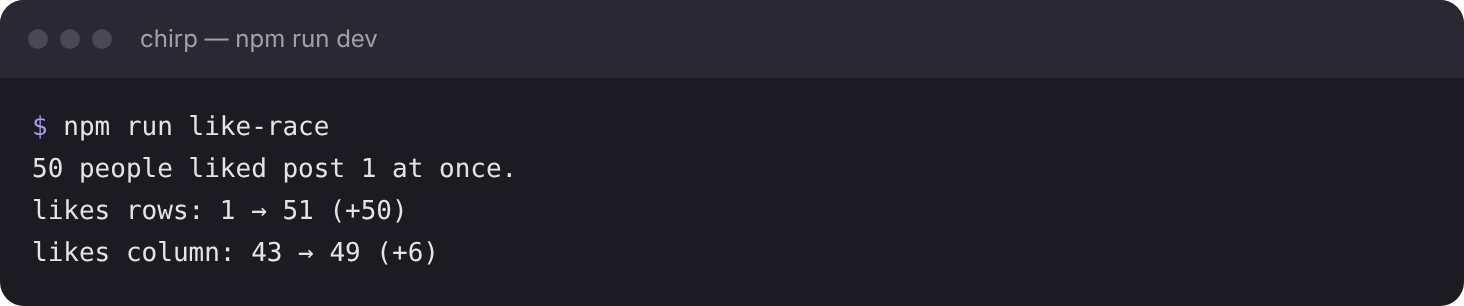
The starter has a script that plays 50 people pressing ♥ at the same moment.
It picks 50 practice people who haven't liked post 1, Ada's, and calls your likePost() for all 50 at once.
Then it prints how many likes rows post 1 gained, and how far its likes column rose.
npm run like-race
So why didn't the count rise by 50?
Each request read the likes column, then wrote back that number plus 1.
But many read it before the others wrote, so they all read the same number.
Each wrote the same plus 1 in place of the others': a lost update.
The likes rows are all there, because each INSERT added its own row.
Your turn 1
In the SQL Editor, count post 1's likes rows. Then, in a new run, read post 1's likes column.
51 likes rows: yours and the race's 50. The likes column says less than 93.
SELECT COUNT(*) FROM likes WHERE post_id = 1;
-- then, in a new run:
SELECT likes FROM posts WHERE id = 1;
You should see
The script prints likes rows: 1 → 51 (+50), but the likes column rose by less than 50.
The number changes from run to run. If it says +50, run it again.
The fix is the UPDATE you know: SET likes = likes + 1, so Postgres reads the count itself.
But Supabase's library can't send it. .update() only sets a number your code worked out.
And each library call is its own request, so your INSERT and UPDATE can't share a BEGIN and COMMIT.
If your server crashed between them, a post would keep the like row without the +1.
So both statements go in a function, saved in your database:
CREATE OR REPLACE FUNCTION like_post(liker_id integer, liked_post_id integer)
RETURNS void
LANGUAGE sql
AS $$
  -- your two statements go here
$$;
A function saves statements under a name, so one call runs them all. This course doesn't teach writing one.
liker_id and liked_post_id are the values each call passes in, and RETURNS void means it sends nothing back.
Postgres runs each call as one transaction, as if BEGIN came before it and COMMIT after.
Your turn 1
Replace the comment with the two statements: add the like, then add 1 to the post's likes. Run it.
Success. No rows returned under the editor.
CREATE OR REPLACE FUNCTION like_post(liker_id integer, liked_post_id integer)
RETURNS void
LANGUAGE sql
AS $$
  INSERT INTO likes (user_id, post_id) VALUES (liker_id, liked_post_id);
  UPDATE posts SET likes = likes + 1 WHERE id = liked_post_id;
$$;
Your turn 2
Call your function to like post 2, Ben's, as you (user 7). Then, in a new run, read post 2's likes.
One row under like_post, with no value in it. Then post 2's likes: 88, up from 87.
SELECT like_post(7, 2);
-- then, in a new run:
SELECT likes FROM posts WHERE id = 2;
Your turn 3
Run the same call again, on its own, and see what Postgres sends back.
Then, in a new run, read post 2's likes.
ERROR: duplicate key value violates unique constraint "likes_pkey", and post 2 still has 88.
The refused INSERT aborted the call's transaction, so nothing in it was kept.
Even if your UPDATE came first, Postgres would undo it, and post 2 would still have 88.
SELECT like_post(7, 2);
-- then, in a new run:
SELECT likes FROM posts WHERE id = 2;
You should see
Post 2 has 88 likes, and likes holds one row for it: user_id 7, post_id 2.
Supabase's library calls a function with .rpc(), for "remote procedure call":
| SQL you know | Supabase's library |
|---|---|
SELECT like_post(7, 3); | .rpc("like_post", { liker_id: 7, liked_post_id: 3 }) |
A refused like comes back as an error, with error.code 23505, as "That handle is taken" did.
Here it only means this person already liked the post, so there's nothing to show.
Your turn 1
Make likePost(postId, userId) call your function, and return quietly when the like is refused as a duplicate.
Press ♥ on Cy's "Hello, world.": its 5 likes become 6.
Press ♥ on Ben's flexbox post, which you liked in the SQL Editor: it stays at 88, with no error.
// SELECT like_post(7, 3);
export async function likePost(postId: number, userId: number) {
  const { error } = await supabase.rpc("like_post", {
    liker_id: userId,
    liked_post_id: postId,
  });
  if (error?.code === "23505") return;
  if (error) throw new Error(error.message);
}
You should see
Cy's post at 6 likes, Ben's still at 88, and no error on either.
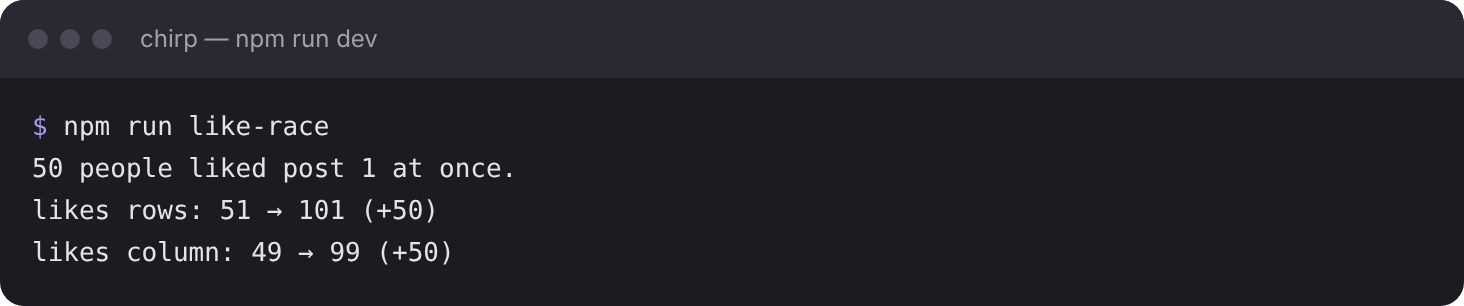
Run the race again. It picks 50 practice people who haven't liked post 1 yet.
npm run like-race
So why does every like count now?
Each call's UPDATE reads the count inside Postgres, as it runs.
And it locks post 1's row until its transaction commits.
So the next call's UPDATE waits for that lock, then starts from the new count.
You should see
likes rows: 51 → 101 (+50), and the likes column rises by +50 too.
Commit your changes, and push them to GitHub.
git add -A
git commit -m "Like posts with one database function"
git push
The likes table and like_post live in your database, not in your repository.
You should see
Your commit on GitHub, with likePost() calling .rpc("like_post", …) in lib/data.ts.
Supabase says your project is paused
Free projects pause after a week with no activity. Press Restore project on its page, and wait a few minutes.
The second call to like_post worked, and post 2 went to 89
likes has no primary key on user_id and post_id together. Check step 1's table in the Table Editor.
You sent the second call and the read in one run, and both failed
Postgres ran them as one transaction, so the call's error aborted the read too. Run the call on its own.
An error like Could not find the function public.like_post
The names in .rpc() must match the function's: like_post, liker_id and liked_post_id. Check each, and that step 4 ran.
After the fix, the race still loses likes
Your function may set likes to a number. It must say likes = likes + 1, so Postgres reads the count as it runs.
A like doesn't show, with no error
Run SELECT like_post(7, 3); in the SQL Editor. If that works, the bug is in your code: check .rpc()'s names.
Tick every step once you've seen what it says you should see. Then mark the project complete to unlock the next lesson.