

Chirp's pages read 20 posts from your posts table, in whatever order Postgres sends them. Since you built that, you've learned to write queries that compare, match text, sort and count.
Maya has shown Chirp to her members, and sent you what they said:
"The newest post should be on top. And I can't find my own old posts."
"Also, how many likes have my posts got?"
So how do those queries become a feed, a search box and a row of numbers?
Each function below is one query you already know how to write in SQL. The designer has built a place on the page for each one, and each still shows sample data.
For each feature, write the query in SQL first, then turn it into the library's methods. The cheat sheet in the top bar lists the method for every piece of SQL you know.
Every list and number on Chirp is sorted, searched, filtered or counted by Postgres.
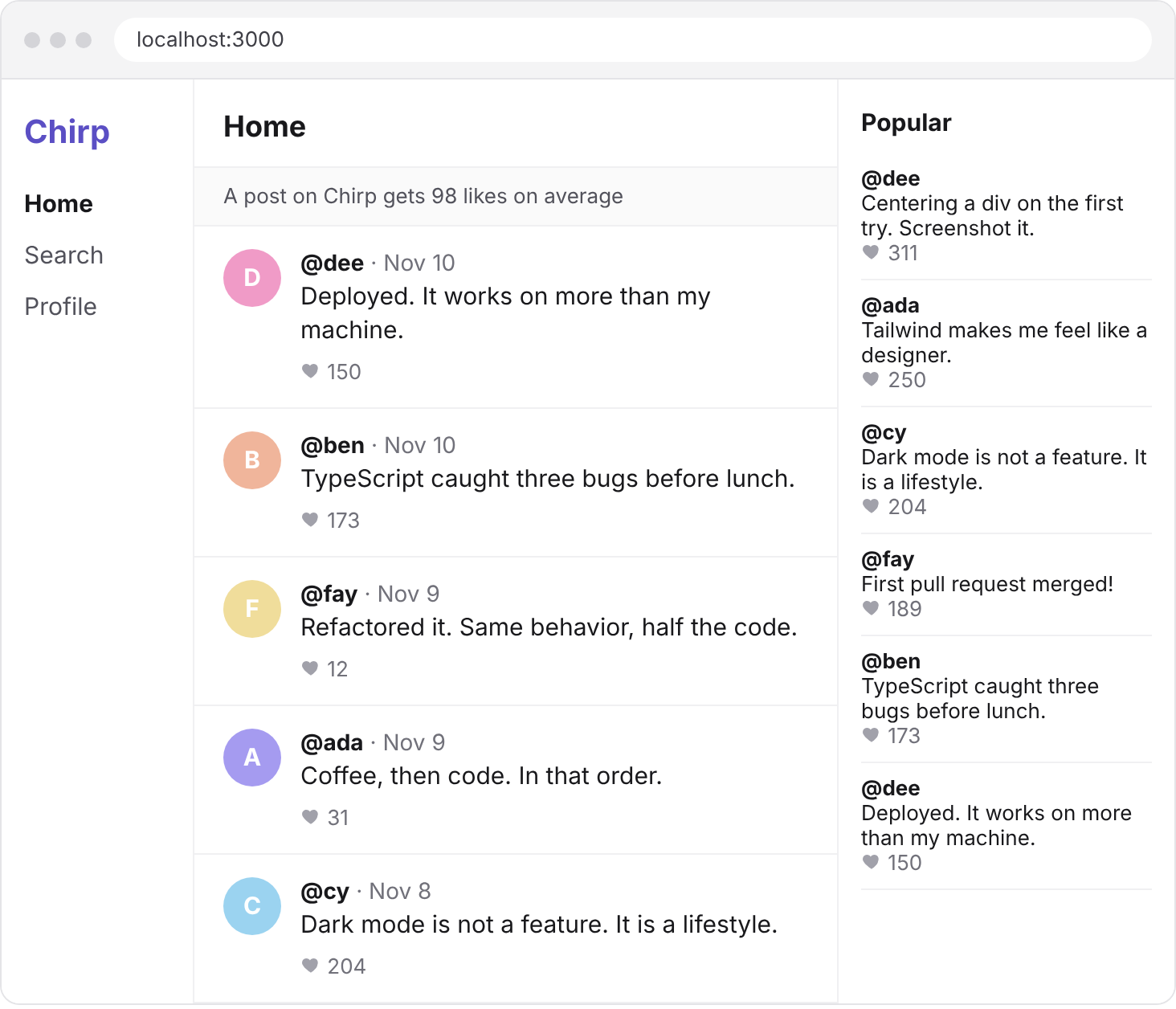
A feed shows the newest posts at the top, and only the first few. In SQL, that's your feed's query with an ORDER BY and a LIMIT added.
SELECT id, handle, body, likes, created_at
FROM posts
ORDER BY created_at DESC
LIMIT 10;
ORDER BY sorts dates the way it sorts numbers: a later date counts as higher. So DESC puts the newest post first.
The library has a method for each of the two:
| SQL you know | Supabase's library |
|---|---|
ORDER BY created_at DESC | .order("created_at", { ascending: false }) |
ORDER BY created_at | .order("created_at") |
LIMIT 10 | .limit(10) |
In lib/data.ts, add them to getPosts().
export async function getPosts() {
  const { data, error } = await supabase
    .from("posts")
    .select("id, handle, body, likes, created_at")
    .order("created_at", { ascending: false })
    .limit(10);
  if (error) throw new Error(error.message);
  return data;
}
Save, and reload localhost:3000.
You should see
Ten posts, with Dee's "Deployed. It works on more than my machine." at the top, and Ada's "Tailwind makes me feel like a designer." last.
From here on, you write the query.
A person's page lists their posts in any order, under a made-up number of posts. It calls two functions in lib/data.ts. You'll change the first, and fill in the second.
Counting looks a little unusual with the library:
| SQL you know | Supabase's library |
|---|---|
SELECT COUNT(*) | .select("*", { count: "exact", head: true }) |
count: "exact" asks Postgres to count every row that passes, and head: true asks for that number alone, with no rows. So the number comes back as count, beside error, and data is null.
Don't fetch a person's posts and count them in JavaScript. Let Postgres send the number.
Your turn 1
Change getPostsBy(handle) so that person's posts come back newest first.
localhost:3000/ada lists Ada's four posts, with "Coffee, then code. In that order." first and "Day 1 of learning SQL" last.
// SELECT id, handle, body, likes, created_at FROM posts
// WHERE handle = 'ada' ORDER BY created_at DESC;
export async function getPostsBy(handle: string) {
  const { data, error } = await supabase
    .from("posts")
    .select("id, handle, body, likes, created_at")
    .eq("handle", handle)
    .order("created_at", { ascending: false });
  if (error) throw new Error(error.message);
  return data;
}
Your turn 2
Make countPostsBy(handle) return how many posts that person has, as a number counted by Postgres.
The top of Ada's page says 4 posts, and Eli's says 2 posts.
And localhost:3000/zoe says 0 posts, because a count of no rows is still a number.
// SELECT COUNT(*) FROM posts WHERE handle = 'ada';
export async function countPostsBy(handle: string) {
  const { count, error } = await supabase
    .from("posts")
    .select("*", { count: "exact", head: true })
    .eq("handle", handle);
  if (error) throw new Error(error.message);
  return count ?? 0;
}
You should see
Ada's page, with 4 posts under her handle and her four posts below it, newest first.
The search page puts whatever a member types into its address, like localhost:3000/search?q=SQL. It hands that text to searchPosts(q), which still returns sample data.
The library's two methods for patterns are named after their SQL: .like(column, pattern) and .ilike(column, pattern). The pattern is a string, with the same percent signs you'd write in SQL.
Your turn 1
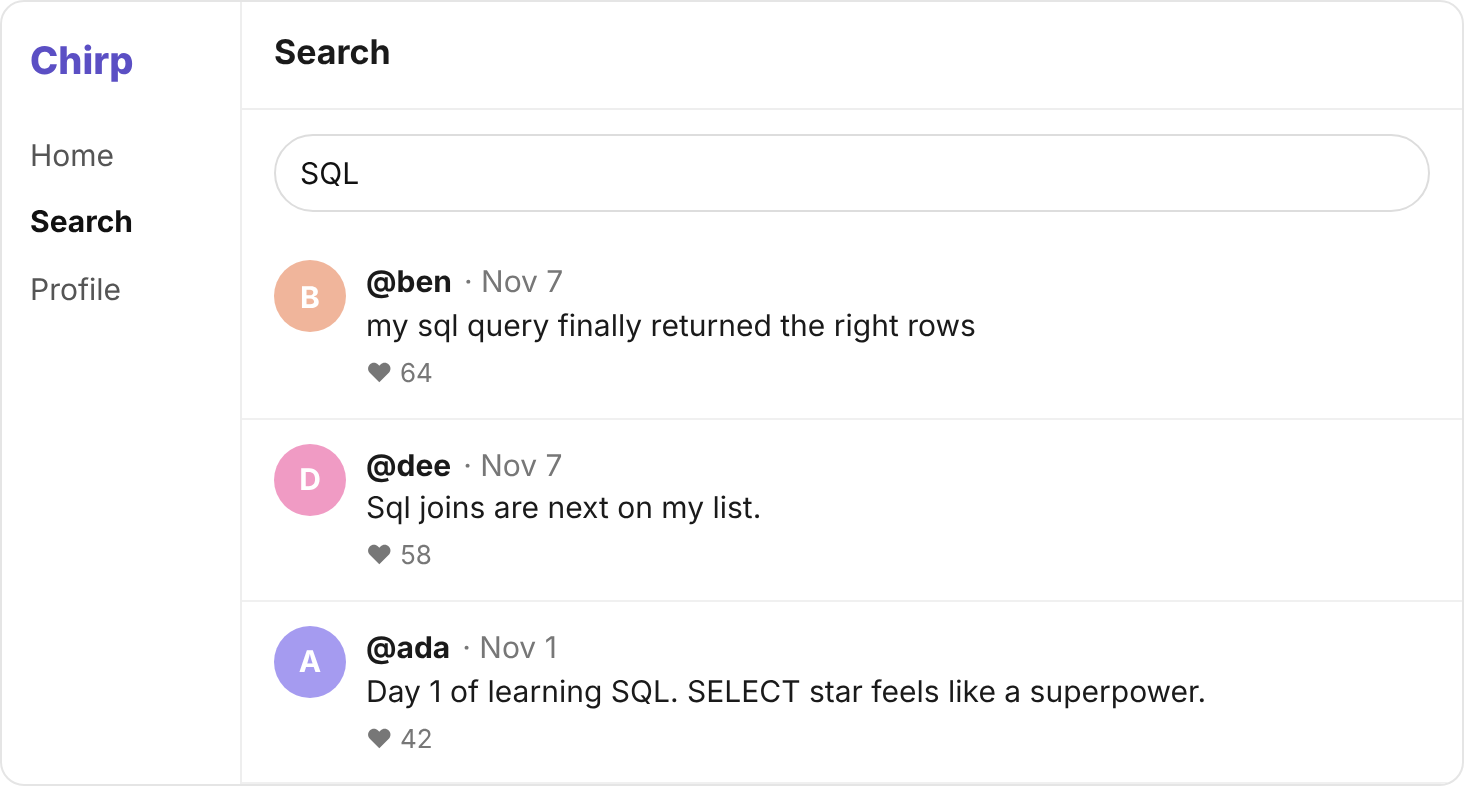
Make searchPosts(q) return the posts with that text anywhere in their body, in capitals or not, newest first. Return the same five columns as the feed.
Searching SQL finds three posts, in this order: Ben's says sql, Dee's says Sql, and Ada's says SQL.
// SELECT id, handle, body, likes, created_at FROM posts
// WHERE body ILIKE '%SQL%' ORDER BY created_at DESC;
export async function searchPosts(q: string) {
  const { data, error } = await supabase
    .from("posts")
    .select("id, handle, body, likes, created_at")
    .ilike("body", `%${q}%`)
    .order("created_at", { ascending: false });
  if (error) throw new Error(error.message);
  return data;
}
Your turn 2
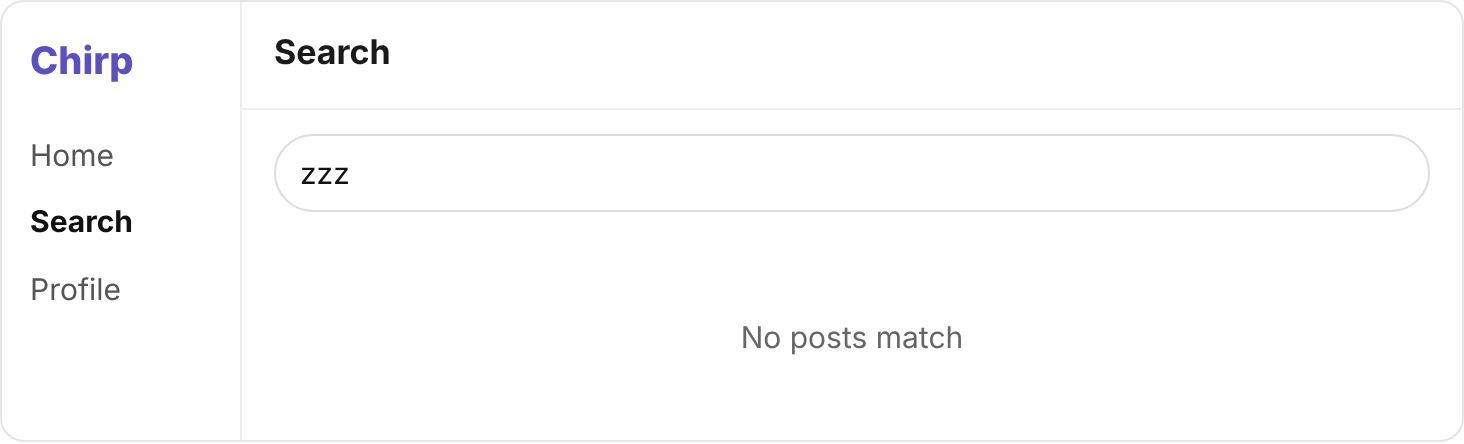
In app/search/page.tsx, show the words No posts match when a search finds nothing.
Searching zzz shows No posts match, and not an empty page.
{posts.length === 0 ? (
  <p className="py-10 text-center text-neutral-500">No posts match</p>
) : (
  <PostList posts={posts} />
)}
You should see
Three posts for SQL, and No posts match for zzz.
Maya wants members to see what did well. The home page has a Popular box beside the feed, and each person's page has a Top posts box. Both still show sample data.
This step and the next one don't name the methods for you. You'll find each one in the cheat sheet, in the top bar. Every list on Chirp takes the same five columns as the feed.
Your turn 1
Make getPopular() return every post with 150 likes or more, most liked first.
Popular lists six posts: Dee's with 311 likes, then Ada's 250, Cy's 204, Fay's 189, Ben's 173, and Dee's with exactly 150.
// SELECT id, handle, body, likes, created_at FROM posts
// WHERE likes >= 150 ORDER BY likes DESC;
export async function getPopular() {
  const { data, error } = await supabase
    .from("posts")
    .select("id, handle, body, likes, created_at")
    .gte("likes", 150)
    .order("likes", { ascending: false });
  if (error) throw new Error(error.message);
  return data;
}
Your turn 2
Make getTopPostsBy(handle) return that person's posts with 100 likes or more, most liked first.
Ada's page lists two top posts. "Tailwind makes me feel like a designer." comes first, with 250 likes.
Then "Shipped my first Next.js page today.", with exactly 100.
And Eli's page says No top posts yet, because neither of Eli's posts has 100 likes.
// SELECT id, handle, body, likes, created_at FROM posts
// WHERE handle = 'ada' AND likes >= 100 ORDER BY likes DESC;
export async function getTopPostsBy(handle: string) {
  const { data, error } = await supabase
    .from("posts")
    .select("id, handle, body, likes, created_at")
    .eq("handle", handle)
    .gte("likes", 100)
    .order("likes", { ascending: false });
  if (error) throw new Error(error.message);
  return data;
}
You should see
Six posts under Popular, from 311 likes down to 150. Two under Ada's Top posts, and No top posts yet on Eli's page.
Above the feed sits a row of small buttons, one for each member. Pressing a few puts their handles in the address, like localhost:3000/?from=ada,fay.
The page then hands those handles, as a list, to getPostsFrom(handles). That function still returns sample data.
Your turn 1
Make getPostsFrom(handles) return all the posts by anyone in that list of handles, newest first.
With ada and fay pressed, the feed lists seven posts and nobody else's.
Fay's "Refactored it. Same behavior, half the code." is first, and Ada's "Day 1 of learning SQL" is last.
// SELECT id, handle, body, likes, created_at FROM posts
// WHERE handle IN ('ada', 'fay') ORDER BY created_at DESC;
export async function getPostsFrom(handles: string[]) {
  const { data, error } = await supabase
    .from("posts")
    .select("id, handle, body, likes, created_at")
    .in("handle", handles)
    .order("created_at", { ascending: false });
  if (error) throw new Error(error.message);
  return data;
}
You should see
Seven posts with ada and fay pressed, four of Ada's and three of Fay's, newest first.
Three numbers on Chirp are still made up: a person's likes, the average on the home page, and the Members box.
You can already count rows with the library. But it keeps SUM, AVG and GROUP BY switched off until you turn them on. That's because a total over a very big table can be slow.
To turn them on, paste these two lines into Supabase's SQL Editor and press Run.
ALTER ROLE authenticator SET pgrst.db_aggregates_enabled = 'true';
NOTIFY pgrst, 'reload config';
They change a setting in your project, so you only run them once. Now the library can add up and group, and both are written inside .select(…):
| SQL you know | Supabase's library |
|---|---|
SELECT SUM(likes) | .select("likes.sum()") |
SELECT AVG(likes) | .select("likes.avg()") |
SELECT handle, COUNT(*) … GROUP BY handle | .select("handle, count()") |
There's no method for GROUP BY. The library groups by every column you select that has no function on it.
Each number comes back in a row, under its function's name: sum, avg or count. A SUM or an AVG over a whole result is a single row. Add .single() at the end to get that row as data, and not a list.
Your turn 1
Make getLikesTotal(handle) return the likes on all of that person's posts, added up by Postgres, as one number.
The top of Ada's page says 4 posts · 423 likes.
// SELECT SUM(likes) FROM posts WHERE handle = 'ada';
export async function getLikesTotal(handle: string) {
  const { data, error } = await supabase
    .from("posts")
    .select("likes.sum()")
    .eq("handle", handle)
    .single();
  if (error) throw new Error(error.message);
  return data.sum;
}
Your turn 2
Make getAverageLikes() return the average likes of all of Chirp's posts, worked out by Postgres, as one number.
The home page says A post on Chirp gets 98 likes on average. Postgres sends 97.95, and the page rounds it.
// SELECT AVG(likes) FROM posts;
export async function getAverageLikes() {
  const { data, error } = await supabase
    .from("posts")
    .select("likes.avg()")
    .single();
  if (error) throw new Error(error.message);
  return data.avg;
}
Your turn 3
Make getPostCounts() return one row for each handle, with how many posts it has, sorted by handle from a to z.
The Members box lists six people, in this order:
| handle | posts |
|---|---|
| ada | 4 |
| ben | 4 |
| cy | 3 |
| dee | 4 |
| eli | 2 |
| fay | 3 |
// SELECT handle, COUNT(*) FROM posts GROUP BY handle ORDER BY handle;
export async function getPostCounts() {
  const { data, error } = await supabase
    .from("posts")
    .select("handle, count()")
    .order("handle");
  if (error) throw new Error(error.message);
  return data;
}
You should see
423 likes on Ada's page. On the home page, an average of 98 likes and a Members box of six people.
Commit your changes, and push them to GitHub.
git add -A
git commit -m "Sort, search, filter and count posts"
git push
Then tell Maya: the newest post is on top, old posts can be found, and the likes are counted.
You should see
Your commit on GitHub, with the new lib/data.ts in it.
Searching SQL finds one post, not three
Your pattern is matching capitals exactly. The lesson Matching Text shows the keyword that ignores them.
Searching SQL finds no posts at all
Your pattern has no stand-in around the word, so only a body that is exactly SQL would match. The lesson Matching Text shows which stand-in matches any number of characters.
A list comes back least liked first, or oldest first
Your sort is lowest first. The lesson Sorting shows the word that turns it around, and the cheat sheet shows how the library writes it.
Popular leaves out Dee's post with exactly 150 likes, or Ada's top posts leave out the one with exactly 100
Your comparison stops just past the number. The lesson Comparing Values shows the sign that lets the number itself pass.
Top posts lists other people's posts, or posts under 100 likes
A top post must pass two conditions at once. The lesson Combining Conditions shows how two are joined, and the cheat sheet how the library writes that.
A person's post count is missing, or the page fails reading data
Read count from what the query sends back, not data. With head: true, data is null.
An error that says Use of aggregate functions is not allowed
Step 6's two lines haven't run in this project. Run them in the SQL Editor, then reload the page.
Members shows one row for every post, not one for each person
Your select asks for a column that differs from post to post, so each post is its own group. The lesson Counting shows which column a group shares.
Tick every step once you've seen what it says you should see. Then mark the project complete to unlock the next lesson.