

Chirp has four tables: users, posts, follows and comments.
Posts, follows and comments all point at users with foreign keys, and comments point at posts too.
But two pages still return sample data: Sign up, and Delete account in Settings.
So what should happen to a person's posts, follows and comments when their account goes?
You'll find out by trying it, with a test account of your own.
Then you'll add rules to the schema, so Postgres does the right thing for every program that writes.
Sign-up that refuses a taken handle, and Delete account that takes a person's posts and leaves their comments as [deleted].
The page at localhost:3000/signup asks for a handle and a name.
It calls createUser(handle, name) in lib/data.ts, which still returns sample data.
When it gets back { id }, the page signs you in as the new user.
So the INSERT must send back the new row's id, with RETURNING.
With Supabase's library, .select("id") after .insert(…) is your RETURNING id.
Your turn 1
Make createUser(handle, name) add a row to users, and return { id } with the new row's id.
Sign up as zed, named Zed. The sidebar says you're signed in as zed, and Switch user lists eight people.
export async function createUser(handle: string, name: string) {
  // INSERT INTO users (handle, name) VALUES ('zed', 'Zed') RETURNING id;
  const { data, error } = await supabase
    .from("users")
    .insert({ handle, name })
    .select("id")
    .single();
  if (error) throw new Error(error.message);
  return { id: data.id };
}
You should see
Signed in as zed, with zed under ada, ben, cy, dee, eli, fay and you in Switch user.
Give zed some rows that point at zed's row in users.
localhost:3000.localhost:3000/post/20, and comment Nice one!localhost:3000/ada, and follow ada.Now zed has a post, a comment and a follow, and someone has commented on zed's post.
You should see
zed's post at the top of the feed with 💬 1, and Dee's "Deployed" card showing one more comment than before.
Open Settings, at localhost:3000/settings.
Its Delete account button calls deleteAccount(userId) with your id, which still does nothing.
Once it returns, the page signs you back in as you.
Your turn 1
Make deleteAccount(userId) delete that user's row from users.
Pressing Delete account as zed sends your DELETE to Postgres.
export async function deleteAccount(userId: number) {
  // DELETE FROM users WHERE id = 8;
  const { error } = await supabase
    .from("users")
    .delete()
    .eq("id", userId);
  if (error) throw new Error(error.message);
}
You should see
An error, not a deleted account:
update or delete on table "users" violates foreign key constraint "posts_user_id_fkey" on table "posts"
zed is still in Switch user, and zed's post is still on the feed.

Postgres refused, because posts' user_id says REFERENCES users (id), and nothing more.
So by default, zed's row can't go while zed's post points at it.
A refused write changes nothing, so zed's post, comment and follow are all still there.
And posts isn't the only table that points at a row zed has:
| Table | Foreign key | Points at |
|---|---|---|
| posts | user_id | users (id) |
| comments | post_id | posts (id) |
| comments | user_id | users (id) |
| follows | follower_id | users (id) |
| follows | followee_id | users (id) |
Here is what Chirp wants when a row is deleted:
For each foreign key, pick refuse, ON DELETE CASCADE or ON DELETE SET NULL.
Your turn 1
Write each foreign key's line as its CREATE TABLE would hold it, with the rule Chirp wants.
Five lines, each ending on its ON DELETE rule, that match the solution's.
-- posts
user_id     integer NOT NULL REFERENCES users (id) ON DELETE CASCADE

-- comments
post_id     integer NOT NULL REFERENCES posts (id) ON DELETE CASCADE
user_id     integer REFERENCES users (id) ON DELETE SET NULL

-- follows
follower_id integer NOT NULL REFERENCES users (id) ON DELETE CASCADE
followee_id integer NOT NULL REFERENCES users (id) ON DELETE CASCADE
You should see
Four CASCADEs and one SET NULL, on comments' user_id, which has no NOT NULL so it can hold NULL.
Your tables already hold rows, so you can't run their CREATE TABLEs again.
ALTER TABLE changes a table that's already there. You'll learn it in Migrations.
For now, paste this into the SQL Editor, and press Run.
ALTER TABLE posts
  DROP CONSTRAINT posts_user_id_fkey,
  ADD FOREIGN KEY (user_id) REFERENCES users (id) ON DELETE CASCADE;

ALTER TABLE comments
  DROP CONSTRAINT comments_post_id_fkey,
  ADD FOREIGN KEY (post_id) REFERENCES posts (id) ON DELETE CASCADE,
  DROP CONSTRAINT comments_user_id_fkey,
  ALTER COLUMN user_id DROP NOT NULL,
  ADD FOREIGN KEY (user_id) REFERENCES users (id) ON DELETE SET NULL;

ALTER TABLE follows
  DROP CONSTRAINT follows_follower_id_fkey,
  ADD FOREIGN KEY (follower_id) REFERENCES users (id) ON DELETE CASCADE,
  DROP CONSTRAINT follows_followee_id_fkey,
  ADD FOREIGN KEY (followee_id) REFERENCES users (id) ON DELETE CASCADE;
Each DROP CONSTRAINT removes an old foreign key, by the name Postgres gave it, like the one in your error.
Each ADD FOREIGN KEY puts it back with one of your lines from the last step.
And DROP NOT NULL lets comments' user_id hold NULL, which SET NULL needs.
You should see
Success. No rows returned under the editor.
As zed, open Settings and press Delete account again.
This time Postgres deletes zed's row, and follows each rule.
CASCADE deletes zed's post and zed's follow. Then it deletes ada's Welcome!, which was on that post.
SET NULL keeps zed's Nice one! on Dee's post, with NULL in its user_id.
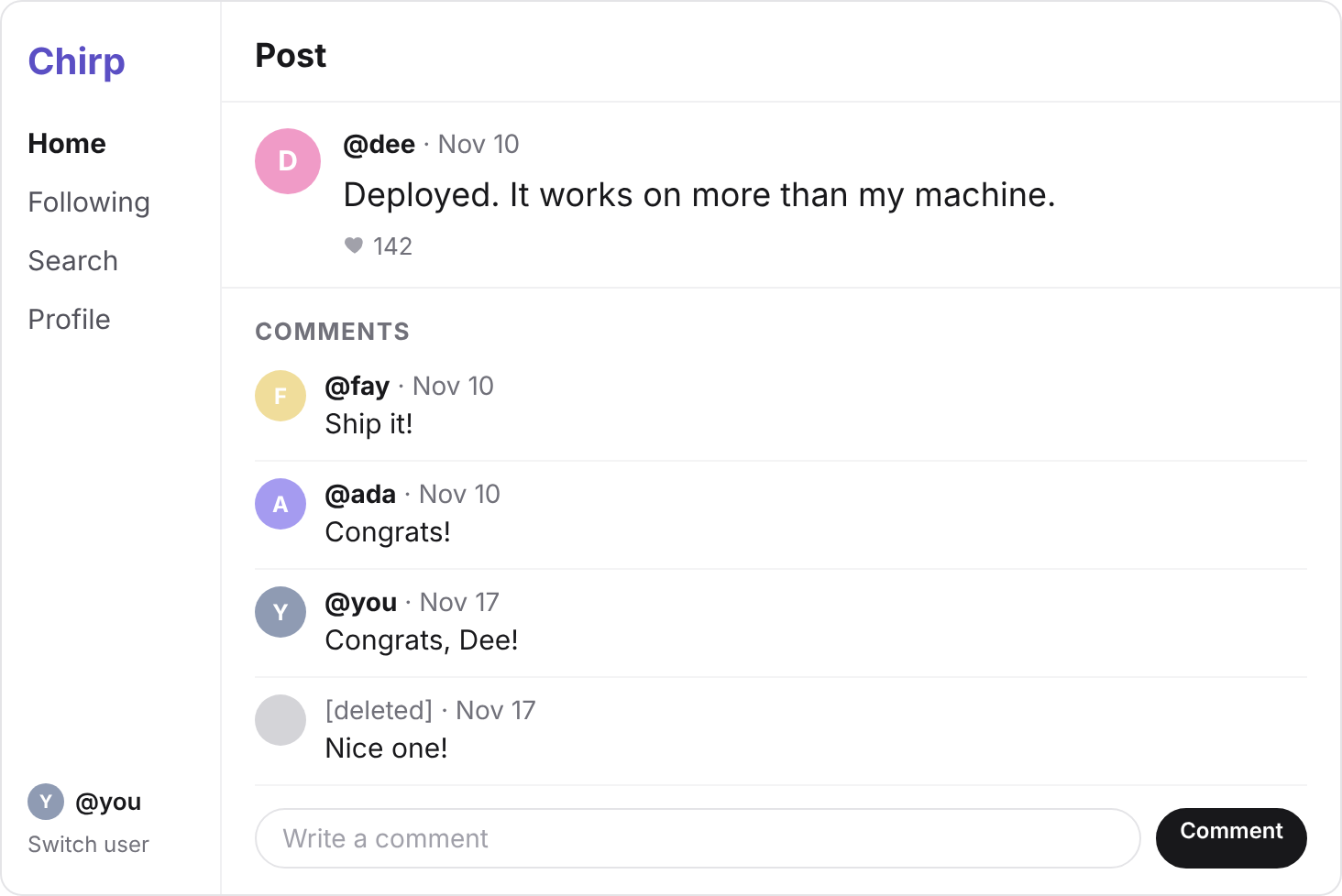
Now open Dee's "Deployed" post, at localhost:3000/post/20.
Why does the page break now?
Because no user has a NULL id, so the JOIN finds no author for Nice one!
getComments sends it back with users: null, and the page reads comment.users.handle.
Your turn 1
In the Comment component, show the word [deleted] where the handle goes when a comment has no author.
Dee's "Deployed" post shows Nice one! under [deleted], below fay's, ada's and your comments.
// user_id is NULL, so the JOIN finds no user, and users comes back as null
<span className="font-medium">{comment.users?.handle ?? "[deleted]"}</span>
You should see
Signed in as you again, with seven people in Switch user and no zed.
zed's post is gone from the feed, and Dee's "Deployed" card still counts zed's comment.
Sign up as ada, named Ada.
It works, and Switch user now lists two adas. So whose profile is localhost:3000/ada?
As the new ada, press Delete account. Nothing points at her row, so she goes.
In a CREATE TABLE, you'd write UNIQUE on handle's line: handle text NOT NULL UNIQUE.
users already holds rows, so paste this ALTER TABLE into the SQL Editor instead, and press Run.
ALTER TABLE users ADD UNIQUE (handle);
Postgres names this rule users_handle_key: the table, the column, then key.
Now sign up as ada again. Postgres refuses the INSERT, and createUser throws an error naming users_handle_key.
Every error also has a code: Postgres gives each kind of refusal its own one.
23505 means a unique constraint refused the write.
Your turn 1
Make createUser(handle, name) return { error: "That handle is taken" } when the error's code is 23505, and still throw for any other error.
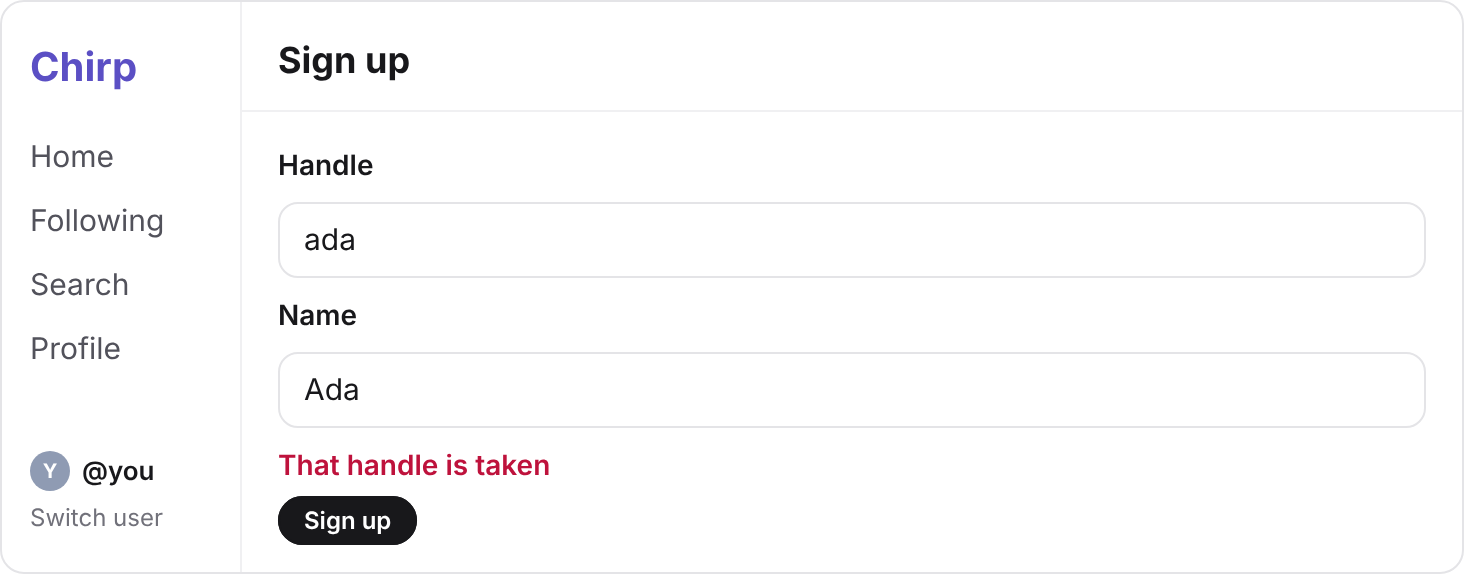
Signing up as ada shows That handle is taken under the form, and Switch user still lists seven people.
export async function createUser(handle: string, name: string) {
  // INSERT INTO users (handle, name) VALUES ('ada', 'Ada') RETURNING id;
  const { data, error } = await supabase
    .from("users")
    .insert({ handle, name })
    .select("id")
    .single();
  if (error?.code === "23505") return { error: "That handle is taken" };
  if (error) throw new Error(error.message);
  return { id: data.id };
}
You should see
That handle is taken for ada, and only one ada in Switch user: the refused INSERT stored nothing.
Commit your changes, and push them to GitHub.
git add -A
git commit -m "Delete accounts and refuse taken handles"
git push
You should see
Your commit on GitHub, with the new lib/data.ts in it.
Step 5's paste says a constraint does not exist
Your foreign key has another name. Run SELECT conname FROM pg_constraint WHERE contype = 'f';, which lists every foreign key's name, and use yours.
Delete account is still refused, naming another foreign key
That foreign key has no rule yet. Run all of step 5's paste again: it's safe to run twice.
Step 7's ALTER TABLE says could not create unique index "users_handle_key"
Two rows still hold ada, and UNIQUE can't be added while they do. Delete the second ada's account first, then run it again.
Signing up as ada still breaks the page
Check error.code before the line that throws, or the throw runs first.
Supabase says your project is paused
Free projects pause after a week with no activity. Press Restore project on its page, and wait a few minutes.
Tick every step once you've seen what it says you should see. Then mark the project complete to unlock the next lesson.